|
|
 Saad Salem
 {K:89003} 8/19/2008
|
I am so happy to help,although it is very little,and I call it ,very small help,accept my regards,
Saad.
|
|
|
|
 Sue O'S
{K:12878} 8/18/2008
Sue O'S
{K:12878} 8/18/2008
|
Hi Stan,
Truth be told, I use the 20D a lot more than the 5D. I like the 5D a lot, but I have PS7 which doesn't process RAW files AND I like the EOS utility for the 20D much better although it won't process 5D RAW files (no clue why). Long story, I know, but the crux is that I shoot the 5D with both RAW and Lfine files (which eats storage) and I shoot the 20D with RAW only. I love RAW and once I commit to an editting software update, I will shoot RAW on both without hesitation. :-)
Cheers!
SueO
PS: I tend to use the 5D for 70-200 and 100-400 wildlife/aviary photography and keep the 16-35 on the 20D all the time.
|
|
|
|
|
Sue O'S
{K:12878} 8/18/2008
|
Hi Saad!
Thanks for taking the time to comment!
I had not thought about what the thumbnail looks like, but you're right - the adherence to the rule of thirds (or really strong suggestion of thirds) makes this rather look like a flag.
Mostly I'm concerned with the subtle shading showing up in a print. Posting on Usefilm is all well and good, but hanging it full sized as a printed work of art, a created effort, is what matters to me. If the depth of the different tones ridges doesn't show up in a print, then the whole image doesn't work for me.
But your obversation is of great use to me; it's the stripey-ness (not a real word!) of it is what has been bothering me. If I cropped this as a long postcard, it wouldn't have that 2:3 ratio as most flags do and it wouldn't niggle at me. I do have another frame which shows a silhouette of some pine trees that might work better with a standard crop.
Thanks! You've been a big help!
|
|
|
|
|
Saad Salem
{K:89003} 8/18/2008
|
looking at thumbnail of the photo,I thought it could be a flag of some nation,I ma telling you this just if you interested to crop it,or to edit it in some way to do so,my regards,Saad.
|
|
|
|
 Stan Hill
{K:35352} 8/18/2008
Stan Hill
{K:35352} 8/18/2008
|
Like your style Sue, I find the form a little annoying as well, just not as creative as you. My rebel is not quite as hungry as the 5D. My step son is a portrait professional and loves his 5D. Do you shoot mostly in RAW? Looking forward to seeing more.
be well, Stan
|
|
|
|
|
Sue O'S
{K:12878} 8/18/2008
|
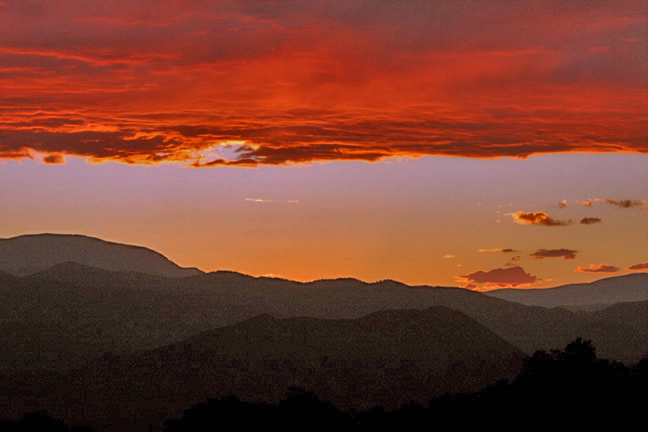
Well, like I said, it looks fine on my monitor until it's posted onto Usefilm. I guess the compression for posting is just too hard on the subtly of the shades and hues.
The real test will be printing. We're living in a rental house while we find the house to buy (we just moved to Colorado from the Midwest of the US), and I haven't unpacked the good printer. Right now, anything I want to print goes to Costco via online. :)
Again, thanks for taking the time. I'll try playing with the curves and NOT changing it from 16-bit to 8-bit and see how it come out. Those foreground mountains are there! I swear! :-)
Cheers!
SueO
|
|
|
|
 Joe Brown
{K:23213} 8/18/2008
Joe Brown
{K:23213} 8/18/2008
|
Hi Sue,
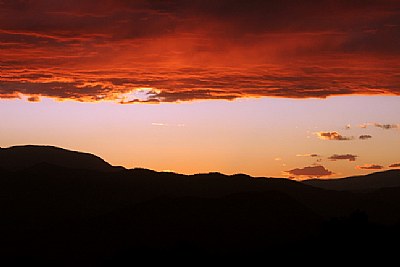
I used primarily the Shadows/Highlights adjustment with a touch of brightness/contrast to try to match your settings for the sky and clouds. Working with the original full size image I suspect your could do something similar with much less noise/pixelation.
Regards,
Joe
|
|
|
|
|
Sue O'S
{K:12878} 8/18/2008
|
Hi Stan!
The question in the upload form "Name of film" makes me bonkers. So I've taken to naming my CF cards. There's Sarah, Millie, Gertrude (named after the duck in Journey to the Center of the Earth), and yet undisclosed is Michelle. I should have named them after famous photogs (Dorothea, Diane, Lisa), but that will have to wait until I buy more CF cards. I have found out that the 5D is a hungry beast and needs larger and larger cards. Talk about all your eggs in one basket!
Cheers!
SueO
|
|
|
|
|
Sue O'S
{K:12878} 8/18/2008
|
Hi there, Joe. Looks like you found my mountains! My original on my PC looks like yours online, except without the pixelation/noise. Since I'm here to learn, what process did you do, other than just adjust brightness/contrast (cuz I noticed my clouds have lost a little something by the upper edge.
Thanks for taking the time to run the image through PS CS3. I have been using PS7, partly out of frugality and partly because it still works well.
|
|
|
|
|
Joe Brown
{K:23213} 8/17/2008
|
I love this shot. I used PH CS3 to bring out the layers of mountains that your speak of. Is this close to what you were hoping it would look like?
Regards,
Joe
|

|
|
|
|
|
Stan Hill
{K:35352} 8/17/2008
|
Sarah did a good job for you with the file format. The color saturation of the clouds is great. The outlines of the mountains are a nice contrast to the cooking reds and pastels that go along with it. Well done, be well, Stan
|
|












 0
0