|
|
 Paul Lara
 {K:88111} 6/2/2006
|
Well, there's always Photoshop to increase either the blurred area or the amount of blur, Peter.
This is nice as is!
|
|
|
|
 metoni .
{K:24727} 2/28/2006
metoni .
{K:24727} 2/28/2006
|
Nice work.
|
|
|
|
 Roberto Arcari Farinetti
{K:209486} 2/25/2006
Roberto Arcari Farinetti
{K:209486} 2/25/2006
|
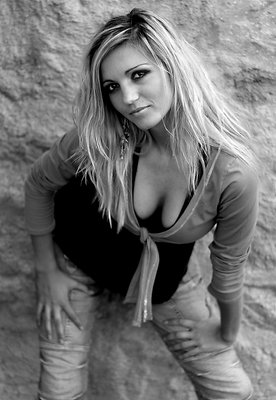
wooww peter, also today in very very lucky day for me, thanks to the fornt page i have seen a great shot!
this one is fantastic the DOf is so perfect in the face and on the chest.. very beautiful model and ;-) stunning expresion, really lovely and likeable.. in my favs
roby
7
..and you in my friendlist.. have a nice week end
|
|
|
|
|
Peter Bernik
{K:74} 11/19/2005
|
Tnx for the advice.
|
|
|
|
|
Paul Lara
{K:88111} 11/19/2005
|
sure you can! You can use a gradient layer to boost the blur as you get farther away from her face, Peter.
Great exposure and nice pose.
|
|
|
|
 Endre Novak
{K:12666} 11/19/2005
Endre Novak
{K:12666} 11/19/2005
|
Good work.
Endre
|
|
|
|
 Guido Tweepenninckx
{K:20076} 11/19/2005
Guido Tweepenninckx
{K:20076} 11/19/2005
|
a real beauty
great picture
|
|
|
|
|
jacques brisebois
{K:73883} 11/19/2005
|
do we have to say anything, she's wonderful. Great portrait.
|
|
|
|
|
Derek Dixon
{K:4948} 11/19/2005
|
nice shot. beautiful tones, good expression and pose by the model. As for DOF... well you could always manipulate the image in PS, will be an easy job
|
|











 0
0 


